15. Regular Expressions
By Bernd Klein. Last modified: 08 Mar 2024.
The aim of this chapter of our Python tutorial is to present a detailed and descriptive introduction into regular expressions. This introduction will explain the theoretical aspects of regular expressions and will show you how to use them in Python scripts.
The term "regular expression", sometimes also called regex or regexp, has originated in theoretical computer science. In theoretical computer science, they are used to define a language family with certain characteristics, the so-called regular languages. A finite state machine (FSM), which accepts language defined by a regular expression, exists for every regular expression. You can find an implementation of a Finite State Machine in Python on our website.
Regular Expressions are used in programming languages to filter texts or textstrings. It's possible to check, if a text or a string matches a regular expression. A great thing about regular expressions: The syntax of regular expressions is the same for all programming and script languages, e.g. Python, Perl, Java, SED, AWK and even X#.
The first programs which had incorporated the capability to use regular expressions were the Unix tools ed (editor), the stream editor sed and the filter grep.
There is another mechanism in operating systems, which shouldn't be mistaken for regular expressions. Wildcards, also known as globbing, look very similar in their syntax to regular expressions. However, the semantics differ considerably. Globbing is known from many command line shells, like the Bourne shell, the Bash shell or even DOS. In Bash e.g. the command "ls .txt" lists all files (or even directories) ending with the suffix .txt; in regular expression notation ".txt" wouldn't make sense, it would have to be written as ".*.txt"
Introduction

When we introduced the sequential data types, we got to know the "in" operator. We check in the following example, if the string "easily" is a substring of the string "Regular expressions easily explained!":
s = "Regular expressions easily explained!"
"easily" in s
OUTPUT:
True
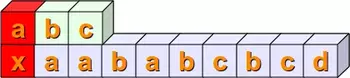
We show step by step with the following diagrams how this matching is performed: We check if the string sub = "abc"

is contained in the string s = "xaababcbcd"

By the way, the string sub = "abc" can be seen as a regular expression, just a very simple one.
In the first place, we check, if the first positions of the two string match, i.e. s[0] == sub[0]. This is not satisfied in our example. We mark this fact by the colour red:
Then we check, if s[1:4] == sub. In other words, we have to check at first, if sub[0] is equal to s[1]. This is true and we mark it with the colour green. Then, we have to compare the next positions. s[2] is not equal to sub[1], so we don't have to proceed further with the next position of sub and s:
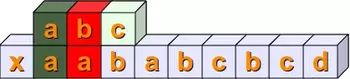
Now we have to check if s[2:5] and sub are equal. The first two positions are equal but not the third:

The following steps should be clear without any explanations:
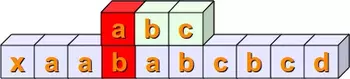
Finally, we have a complete match with s[4:7] == sub :

Live Python training

Enjoying this page? We offer live Python training courses covering the content of this site.
See our Python training courses
A Simple Regular Expression
As we have already mentioned in the previous section, we can see the variable "sub" from the introduction as a very simple regular expression. If you want to use regular expressions in Python, you have to import the re module, which provides methods and functions to deal with regular expressions.
Representing Regular Expressions in Python
From other languages you might be used to representing regular expressions within Slashes "/", e.g. that's the way Perl, SED or AWK deals with them. In Python there is no special notation. Regular expressions are represented as normal strings.
But this convenience brings along a small problem: The backslash is a special character used in regular expressions, but is also used as an escape character in strings. This implies that Python would first evaluate every backslash of a string and after this - without the necessary backslashes - it would be used as a regular expression. One way to prevent this could be writing every backslash as "\" and this way keep it for the evaluation of the regular expression. This can cause extremely clumsy expressions. E.g. a backslash in a regular expression has to be written as a double backslash, because the backslash functions as an escape character in regular expressions. Therefore, it has to be quoted. The same is valid for Python strings. The backslash has to be quoted by a backslash. So, a regular expression to match the Windows path "C:\programs" corresponds to a string in regular expression notation with four backslashes, i.e. "C:\\programs".
The best way to overcome this problem would be marking regular expressions as raw strings. The solution to our Windows path example looks like this as a raw string:
r"C:\\programs"
Let's look at another example, which might be quite disturbing for people who are used to wildcards:
r"^a.*\.html$"
The regular expression of our previous example matches all file names (strings) which start with an "a" and end with ".html". We will the structure of the example above in detail explain in the following sections.
Live Python training
Enjoying this page? We offer live Python training courses covering the content of this site.
Upcoming online Courses
See our Python training courses
Syntax of Regular Expression
r"cat"
is a regular expression, though a very simple one without any metacharacters. Our RE
r"cat"
matches, for example, the following string: "A cat and a rat can't be friends."
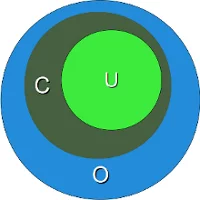
Interestingly, the previous example shows already a "favourite" example for a mistake, frequently made not only by beginners and novices but also by advanced users of regular expressions. The idea of this example is to match strings containing the word "cat". We are successful at this, but unfortunately we are matching a lot of other words as well. If we match "cats" in a string that might be still okay, but what about all those words containing this character sequence "cat"? We match words like "education", "communicate", "falsification", "ramifications", "cattle" and many more. This is a case of "over matching", i.e. we receive positive results, which are wrong according to the problem we want to solve.
We have illustrated this problem in the diagram above. The dark green Circle C corresponds to the set of "objects" we want to recognize. But instead we match all the elements of the set O (blue circle). C is a subset of O. The set U (light green circle) in this diagram is a subset of C. U is a case of "under matching", i.e. if the regular expression is not matching all the intended strings. If we try to fix the previous RE, so that it doesn't create over matching, we might try the expression
r" cat "
. These blanks prevent the matching of the above mentioned words like "education", "falsification" and "ramification", but we fall prey to another mistake. What about the string "The cat, called Oscar, climbed on the roof."? The problem is that we don't expect a comma but only a blank surrounding the word "cat".
Before we go on with the description of the syntax of regular expressions, we want to explain how to use them in Python:
import re
x = re.search("cat", "A cat and a rat can't be friends.")
print(x)
OUTPUT:
<re.Match object; span=(2, 5), match='cat'>
x = re.search("cow", "A cat and a rat can't be friends.")
print(x)
OUTPUT:
None
In the previous example we had to import the module re to be able to work with regular expressions. Then we used the method search from the re module. This is most probably the most important and the most often used method of this module. re.search(expr,s) checks a string s for an occurrence of a substring which matches the regular expression expr. The first substring (from left), which satisfies this condition will be returned. If a match has been possible, we get a so-called match object as a result, otherwise the value will be None. This method is already enough to use regular expressions in a basic way in Python programs. We can use it in conditional statements: If a regular expression matches, we get an SRE object returned, which is taken as a True value, and None, which is the return value if it doesn't match, is taken as False: