20. For Loops
By Bernd Klein. Last modified: 13 Feb 2025.
Introduction

A for loop in Python is used for iterating over a sequence (such as a list, tuple, string, or range) or other iterable objects. It's a fundamental control structure in programming that allows you to repeat a block of code a specific number of times or iterate through the elements of a sequence.
So what about the while loop? Do we need another kind of a loop in Python? Can we not do everything with the while loop? Yes, we can rewrite 'for' loops as 'while' loops. But before we go on, you want to see at least one example of a for loop.
Live Python training

Enjoying this page? We offer live Python training courses covering the content of this site.
See our Python training courses
Syntax of the For Loop
As we mentioned earlier, the Python for loop is an iterator based for loop. It steps through the items of lists, tuples, strings, the keys of dictionaries and other iterables. The Python for loop starts with the keyword "for" followed by an arbitrary variable name, which will hold the values of the following sequence object, which is stepped through. The general syntax looks like this:
for <variable> in <sequence>:
    <statements>
else:
    <statements>
A first example of a for loop:
performance_levels = ('beginner', 'novice', 'intermediate', 'advanced', 'expert')

# Iterate through each level in the tuple
for level in performance_levels:
    # Print the current level
    print(level)
OUTPUT:
beginner
novice
intermediate
advanced
expert
The for loop is used to go through each element in the performance_levels tuple one by one. In each iteration, the loop variable level will take on the value of the current element in the tuple.
Inside the loop, the print() function is used to display the current value of the level variable. This means that it will print each performance level to the screen, starting with "beginner," then "novice," and so on, until it reaches "expert."
The loop will continue to iterate until it has gone through all the elements in the performance_levels tuple.
To summarize:
The items of the sequence object are assigned one after the other to the loop variable; to be precise the variable points to the items. For each item the loop body is executed.
We mentioned before that we can rewrite a for loop as a while statement. In this case it looks like this:
performance_levels = ('beginner', 'novice', 'intermediate', 'advanced', 'expert')

# Initialize an index to 0
index = 0

# Use a while loop to iterate through each level in the tuple
while index < len(performance_levels):
    # Get the current level from the tuple
    level = performance_levels[index]

    # Print the current level
    print(level)

    # Increment the index to move to the next level
    index += 1
We can easily see that the for loop is more elegant and less error prone in this case.
Different Kinds of for Loops
If you are beginner in programming, you can or maybe you should even skip this subchapter, in which we will talk about different ways implementations of for loops in other programming languages.
There are hardly any programming languages without for loops, but the for loop exists in many different flavours, i.e. both the syntax and the semantics differs from one programming language to another.
Different kinds of for loops:
-
Count-controlled for loop (Three-expression for loop)
This is by far the most common type. This statement is the one used by C. The header of this kind of for loop consists of a three-parameter loop control expression. Generally it has the form: for (A; Z; I) A is the initialisation part, Z determines a termination expression and I is the counting expression, where the loop variable is incremented or dcremented. An example of this kind of loop is the for-loop of the programming language C: for (i=0; i <= n; i++) This kind of for loop is not implemented in Python!
-
Numeric Ranges
This kind of for loop is a simplification of the previous kind. It's a counting or enumerating loop. Starting with a start value and counting up to an end value, like for i = 1 to 100 Python doesn't use this either.
-
Vectorized for loops
They behave as if all iterations are executed in parallel. That is, for example, all expressions on the right side of assignment statements get evaluated before the assignments.
-
Iterator-based for loop
Finally, we come to the one used by Python. This kind of for loop iterates over an enumeration of a set of items. It is usually characterized by the use of an implicit or explicit iterator. In each iteration step a loop variable is set to a value in a sequence or other data collection. This kind of for loop is known in most Unix and Linux shells and it is the one which is implemented in Python.
Live Python training
Enjoying this page? We offer live Python training courses covering the content of this site.
Upcoming online Courses
See our Python training courses
More about the Python for Loop
Another Example of a simple for loop in Python. We will also use this example in the following:
languages = ["C", "C++", "Perl", "Python"]
for language in languages:
    print(language)
OUTPUT:
C
C++
Perl
Python

The else block is special; while Perl programmer are familiar with it, it's an unknown concept to C and C++ programmers. Semantically, it works exactly as the optional else of a while loop. It will be executed only if the loop hasn't been "broken" by a break statement. So it will only be executed, after all the items of the sequence in the header have been used.
If a break statement has to be executed in the program flow of the for loop, the loop will be exited and the program flow will continue with the first statement following the for loop, if there is any at all. Usually break statements are wrapped into conditional statements, e.g.
edibles = ["bacon", "spam", "eggs", "nuts"]
for food in edibles:
    if food == "spam":
        print("No more spam please!")
        break
    print("Great, delicious " + food)
else:
    print("I am so glad: No spam!")
print("Finally, I finished stuffing myself")
OUTPUT:
Great, delicious bacon
No more spam please!
Finally, I finished stuffing myself
Removing "spam" from our list of edibles, we will gain the following output:
$ python for.py
Great, delicious bacon
Great, delicious eggs
Great, delicious nuts
I am so glad: No spam!
Finally, I finished stuffing myself
$
Maybe, our disgust with spam is not so high that we want to stop consuming the other food. Now, this calls the continue statement into play . In the following little script, we use the continue statement to go on with our list of edibles, when we have encountered a spam item. So continue prevents us from eating spam!
edibles = ["bacon", "spam", "eggs","nuts"]
for food in edibles:
    if food == "spam":
        print("No more spam please!")
        continue
    print("Great, delicious " + food)

print("Finally, I finished stuffing myself")
OUTPUT:
Great, delicious bacon
No more spam please!
Great, delicious eggs
Great, delicious nuts
Finally, I finished stuffing myself
The range() Function
The built-in function range() is the right function to iterate over a sequence of numbers. It generates an iterator of arithmetic progressions: Example:
range(5)
OUTPUT:
range(0, 5)
This result is not self-explanatory. It is an object which is capable of producing the numbers from 0 to 4. We can use it in a for loop and you will see what is meant by this:
for i in range(5):
    print(i)
OUTPUT:
0
1
2
3
4
range(n) generates an iterator to progress the integer numbers starting with 0 and ending with (n -1). To produce the list with these numbers, we have to cast range() with the list(), as we do in the following example.
list(range(10))
OUTPUT:
[0, 1, 2, 3, 4, 5, 6, 7, 8, 9]
range() can also be called with two arguments:
range(begin, end)
The above call produces the list iterator of numbers starting with begin (inclusive) and ending with one less than the number end.
Example:
range(4, 10)
OUTPUT:
range(4, 10)
list(range(4, 10))
OUTPUT:
[4, 5, 6, 7, 8, 9]
So far the increment of range() has been 1. We can specify a different increment with a third argument. The increment is called the step. It can be both negative and positive, but not zero:
range(begin,end, step)
Example with step:
list(range(4, 50, 5))
OUTPUT:
[4, 9, 14, 19, 24, 29, 34, 39, 44, 49]
It can be done backwards as well:
list(range(42, -12, -7))
OUTPUT:
[42, 35, 28, 21, 14, 7, 0, -7]
The range() function is especially useful in combination with the for loop, as we can see in the following example. The range() function supplies the numbers from 1 to 100 for the for loop to calculate the sum of these numbers:
n = 100

sum = 0
for counter in range(1, n+1):
    sum = sum + counter

print("Sum of 1 until %d: %d" % (n, sum))
OUTPUT:
Sum of 1 until 100: 5050
Live Python training
Enjoying this page? We offer live Python training courses covering the content of this site.
See our Python training courses
Calculation of the Pythagorean Numbers
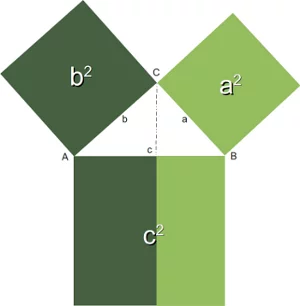
Generally, it is assumed that the Pythagorean theorem was discovered by Pythagoras that is why it has his name. However, there is a debate whether the Pythagorean theorem might have been discovered earlier or by others independently. For the Pythagoreans, - a mystical movement, based on mathematics, religion and philosophy, - the integer numbers satisfying the theorem were special numbers, which had been sacred to them.
These days Pythagorean numbers are not mystical anymore. Though to some pupils at school or other people, who are not on good terms with mathematics, they may still appear so.
So the definition is very simple: Three integers satisfying a2+b2=c2 are called Pythagorean numbers.
The following program calculates all pythagorean numbers less than a maximal number. Remark: We have to import the math module to be able to calculate the square root of a number.
from math import sqrt
n = int(input("Maximal Number? "))
for a in range(1, n+1):
    for b in range(a, n):
        c_square = a**2 + b**2
        c = int(sqrt(c_square))
        if ((c_square - c**2) == 0):
            print(a, b, c)
OUTPUT:
3 4 5
5 12 13
6 8 10
7 24 25
8 15 17
9 12 15
10 24 26
12 16 20
15 20 25
18 24 30
20 21 29
21 28 35
Iterating over Lists with range()
If you have to access the indices of a list, it doesn't seem to be a good idea to use the for loop to iterate over the lists. We can access all the elements, but the index of an element is not available. However, there is a way to access both the index of an element and the element itself. The solution lies in using range() in combination with the length function len():
fibonacci = [0, 1, 1, 2, 3, 5, 8, 13, 21]
for i in range(len(fibonacci)):
    print(i,fibonacci[i])
print()
OUTPUT:
0 0
1 1
2 1
3 2
4 3
5 5
6 8
7 13
8 21
Remark: If you apply len() to a list or a tuple, you get the number of elements of this sequence.
Live Python training
Enjoying this page? We offer live Python training courses covering the content of this site.
See our Python training courses