

A Python set is a collection of distinct elements. The set has some things in common with Python lists and tuples, but there are important differences:
- A Python set can only contain unique values
- Sets are unordered
More formally: sets are unordered collections of distinct objects. In this article, we’ll closely examine sets and how to use them. I’ll focus more on the extras that a set has to offer than on the basics that are the same for lists and other sequence types.
How to create a Python set
Depending on the situation, there are a couple of ways to create a Python set. To create a set from scratch and directly add some elements to it, you can use curly braces:
names = { "Eric", "Ali", "John" }
# Mixed types are allowed
mixed_set = { 'a', 1, (1, 2) }Code language: Python (python)
Sets use the same curly braces as Python dictionaries, but they are easy to distinguish because a set always contains a sequence of elements separated by commas. In contrast, dictionaries contain key-value pairs that are specified with colons.
To create an empty set, you can use the set() function:
my_set = set()
my_set.add(1)
my_set.add('Erik')Code language: Python (python)
As you can see, you can add elements to a set using the add method on a set object. If you want to add multiple elements at once, you need to use the update method and provide an iterable object like a list, range, or tuple:
my_set = set()
my_set.update(range(3))
my_set.update(['a', 'b'])
print(my_set)
# {0, 1, 2, 'b', 'a'}Code language: Python (python)
You can also use the set() function to convert any iterable object into a set:
print( set([1, 2, 3]) )
# {1, 2, 3}

print( set(range(3)) )
# {0, 1, 2}Code language: Python (python)
Finally, you can use a set comprehension to create sets. Set comprehensions work exactly like list comprehensions, so I suggest reading the linked article if the concept is new to you.
Here’s an example for the sake of demonstration. Remember that strings are sequence objects, too, so they are iterable. Since we can filter a set comprehension, let’s filter punctuation and space characters as well:
my_set = { x for x in 'Hi, my name is...' if x not in '., ' }
print(my_set)
# {'n', 'a', 'e', 'i', 's', 'y', 'H', 'm'}Code language: Python (python)
And with this example, it becomes abundantly clear that sets have no order!
Sets and lists
Before continuing, I want to share two commonly used tricks that we can perform using sets.
Deduplicate a list
Sets only contain unique elements and we can create a set by giving the set() function a list. Those are all the ingredients you need to deduplicate a list. Deduplication is the process of removing duplicates and converting a list to a set is by far to easiest way to do this in Python:
my_list = [1, 1, 1, 2, 3, 4, 4, 4, 4, 2, 2, 2]
my_set = set(my_list)
print(my_set)
# {1, 2, 3, 4}Code language: Python (python)
Convert set to list
To convert a set to a list, simply create a new list with the set as the argument:
A = { 1, 2, 3 }
my_list = list(A)
print(my_list)
#  [1, 2, 3]Code language: Python (python)
Why would you need sets?
People use sets for a number of reasons.
- The most common one is to remove duplicates from a sequence (like lists, as demonstrated before)
- Many use them to perform membership testing (is an element present in this set of unique elements)
But there are more reasons to use sets. If you’re unfamiliar with set theory, you might want to read about it on Wikipedia. I’ll do my best to explain the basics, too, though. In short: sets can be used to perform mathematical set operations like:
- Finding the difference between two sets
- Union: combining sets and only keeping unique elements
- Intersection: which elements are present in both sets
- Finding subsets and supersets
These operations can be visualized with a Venn diagram. Venn diagrams show the logical relation between sets. Chances are you’ve seen the following before in your life:
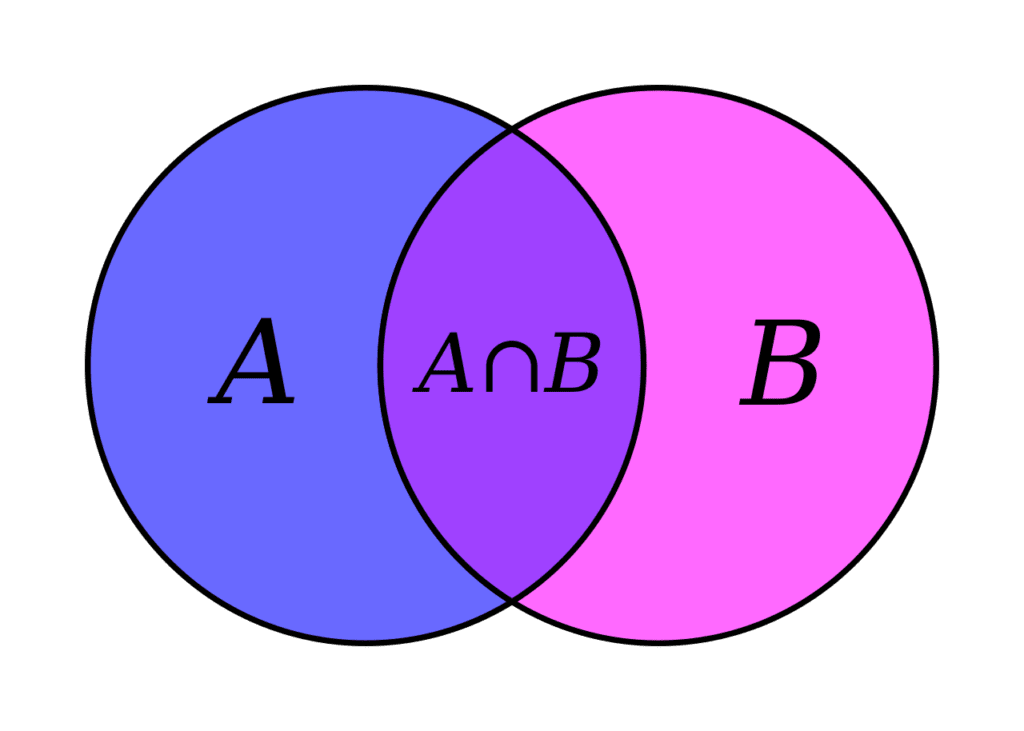

In the following examples, I’ll refer back to this image and use the names A and B. All the examples here use two sets, but it’s important to know they work just as well with more than two sets.
Mathematical Python set operations
This section will demonstrate and explain all the mathematical set operations. Don’t let the math part scare you, it’s not that hard!
Finding the difference between Python sets
Let’s define two sets, A and B, and find the difference between them. What is the difference between two sets? When looking at the Venn diagram, we want to find the elements that are only present in A. In other words, we want to get rid of any overlapping elements that are also in B. Or, even more specific: we want all elements that are in A but not in A ∩ B.
We can do so by using the minus (subtraction) operator:
A = { 1, 2, 3, 4, 5 }
B = { 3, 4, 5, 6, 7 }

print(A-B)
#  {1, 2}

# And the reverse
print(B-A)
# {6, 7}Code language: Python (python)
A and B have some overlap: the numbers 3, 4, and 5 are in both sets. These numbers fall into the section that is labeled with A ∩ B when looking at the Venn diagram. If we want only the unique numbers that are in A, we ‘subtract’ B from A by using A – B. When we only want the unique set of numbers from B, we subtract A from B: B – A.
Find the symmetric difference between Python sets
The symmetric difference between two sets consists of the elements that are either in set A or in set B, but not in both. In other words: all the elements in A plus the elements from B, minus the A ∩ B part. To find the symmetric difference, we can use the ^ operator:
A = { 1, 2, 3, 4, 5 }
B = { 3, 4,